wslmanager
WSL Manager is a graphical interface tool for managing Windows Subsystem for Linux and native Linux/macOS virtual machines on macOS.
- Region
- Overseas
- Pricing
- Free
- Open source
- Yes
- GitHub Stars
- ★ 4.0k
- Views
- 5
- Source
- GitHub
- Added
- 2026-09-21
- Last verified
- 2026-09-21
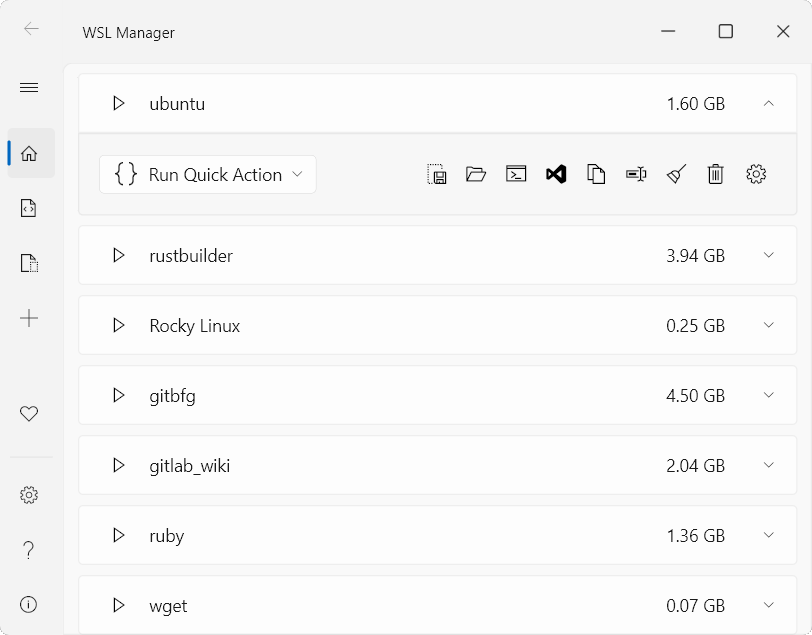
Overview
WSL Manager is a free and open-source graphical tool for managing and configuring Windows Subsystem for Linux (WSL) as well as native Linux and macOS virtual machines on macOS. It offers a range of features including installing, backing up, moving, and configuring distributions without needing to remember complex command-line parameters. Additionally, it includes an AI assistant and an MCP server, enabling remote management of WSL environments via SSH. For developers, this is a highly convenient tool that simplifies the management of WSL and virtual machines.
Key features
- ▪Graphical interface for managing WSL distributions
- ▪Supports remote WSL access via SSH
- ▪Built-in AI assistant and MCP server
- ▪Supports native virtual machines on macOS
Use cases
Pros
- +Simple graphical interface operation
- +Supports multiple distributions
- +Built-in AI assistant
- +Supports remote management
Limitations / notes
- -Requires internet connection
- -Higher learning curve
Who it's for
This overview was compiled by AI from public sources and may contain inaccuracies — please refer to the official site.
FAQ
Is it free?
Yes, WSL Manager is free and open-source.
Does it support Chinese?
Yes, it provides versions in Simplified and Traditional Chinese.
Can it be used on macOS?
Yes, it supports native Linux and macOS virtual machines on macOS.
Does it require internet connectivity?
Partially—features like remote WSL access require an internet connection.
Similar agents
Cursor
FeaturedAI-powered code editor with Agent mode
Dify
FeaturedOpen-source LLMOps + Agent orchestration platform
扣子 Coze
FeaturedByteDance's no-code Agent/Bot building platform
Trae
FeaturedAI IDE (with Agent) from ByteDance
LangChain
FeaturedThe most mainstream LLM/Agent orchestration framework
Devin
FeaturedAutonomous software engineer Agent by Cognition
Something wrong? Let us know on the About page and we'll fix it.